How to Start a Cheap Website That can be Monetised Effectively?
You can speedwalk towards your financial goals with a cheap website that can be monetised effectively. How to create such a cheap website? Find out right here.
By Manuela Willbold
1581 words
Imagine if you could make an additional £15 every day. It doesn’t sound like a lot, right?
But by the end of the week, it would be £105. And by the end of the month, you’d have an additional £450. Good enough now?
You could easily bring home the dress that you see every day on the storefront.
You’d have the funds for that fancy dinner date, or you could save or invest it in generating even more money.
Now, what if I tell you that you can make a lot of additional cash every day (more than £15) with a cheap website of your own?
I know what you are thinking.
How can I make money from a website?
And how can I build a cheap website?
Read on to find the answers to both of your questions to start building an additional income stream from a web presence just as money saving expert Martin Lewis did with his website.
 Estimates suggest that a sophisticated WordPress site could cost upwards of £1,000/year.
But even that much investment is not always necessary. I do have a couple of secrets up my sleeves to help you create a cheap website. (And yes, that site can still be effectively monetised.)
Here’s my 6-step process that you can follow:
Estimates suggest that a sophisticated WordPress site could cost upwards of £1,000/year.
But even that much investment is not always necessary. I do have a couple of secrets up my sleeves to help you create a cheap website. (And yes, that site can still be effectively monetised.)
Here’s my 6-step process that you can follow:
 The only thing you’ll need to pay for if you create a WordPress website is the hosting.
However, SeekaHost offers free WordPress hosting.
And that can strike off one more expense from your list, further helping you build a cheap website.
The free WordPress hosting plan comes with a limited web space of 500MB and doesn’t allow ads on the site. But that is sufficient if you are just starting out. You can use the free hosting to experiment with your site and establish a firm hand on it.
Later, you can go for the £1/month WordPress hosting plan for making your cheap website more advanced and this includes free migration services and more.
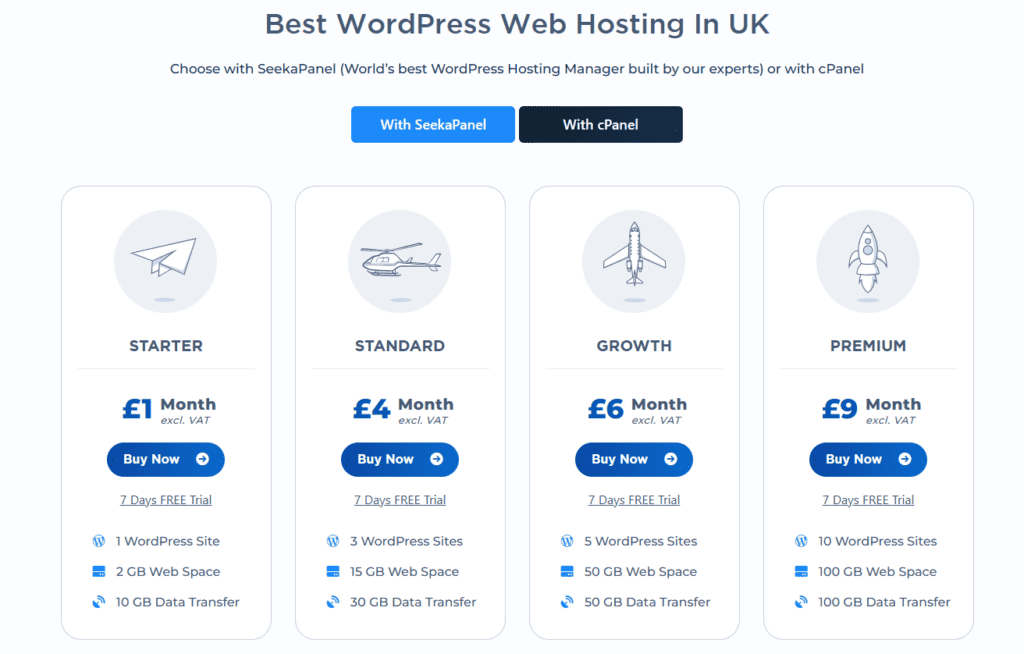
The various SeekaHost WordPress hosting plans for creating cheap websites are shown below and they are available with the famous cPanel or SeekaPanel:
Important: If you are new to the world of website building, hosting can be a bit tricky for you. But don’t worry, here’s a WordPress hosting guide that will help you manage your WP hosting. The guide also offers a few more tips for bringing down the cost of your website.
The only thing you’ll need to pay for if you create a WordPress website is the hosting.
However, SeekaHost offers free WordPress hosting.
And that can strike off one more expense from your list, further helping you build a cheap website.
The free WordPress hosting plan comes with a limited web space of 500MB and doesn’t allow ads on the site. But that is sufficient if you are just starting out. You can use the free hosting to experiment with your site and establish a firm hand on it.
Later, you can go for the £1/month WordPress hosting plan for making your cheap website more advanced and this includes free migration services and more.
The various SeekaHost WordPress hosting plans for creating cheap websites are shown below and they are available with the famous cPanel or SeekaPanel:
Important: If you are new to the world of website building, hosting can be a bit tricky for you. But don’t worry, here’s a WordPress hosting guide that will help you manage your WP hosting. The guide also offers a few more tips for bringing down the cost of your website.
 A domain name is the name of your website and your address on the Internet. And you must pay an annual fee to use a domain name of your choice.
Though the cost seems low, it can quickly pile up and turn your cheap website into an expensive site. To avoid that, you can use cheap domain names from SeekaHost starting from just under £4 per year for a .co.uk domain.
SeekaHost offers a lot of cheap .com domains too, which are by far the most popular for commercial websites with an international target audience. But that's not all. You can also find cheap .in domains and many more.
Before registering a domain, read the SeekaHost domain registration guide first. It will help ensure you register the right domain at the lowest cost.
A domain name is the name of your website and your address on the Internet. And you must pay an annual fee to use a domain name of your choice.
Though the cost seems low, it can quickly pile up and turn your cheap website into an expensive site. To avoid that, you can use cheap domain names from SeekaHost starting from just under £4 per year for a .co.uk domain.
SeekaHost offers a lot of cheap .com domains too, which are by far the most popular for commercial websites with an international target audience. But that's not all. You can also find cheap .in domains and many more.
Before registering a domain, read the SeekaHost domain registration guide first. It will help ensure you register the right domain at the lowest cost.
 The SeekaHost Starter plan (£1/month) comes with more than just WordPress hosting.
With such an affordable hosting plan, you can save the money you’d otherwise have to spend on:
The SeekaHost Starter plan (£1/month) comes with more than just WordPress hosting.
With such an affordable hosting plan, you can save the money you’d otherwise have to spend on:
Creating a cheap website: A 6-step, fail-proof process
Estimates suggest that a sophisticated WordPress site could cost upwards of £1,000/year.
But even that much investment is not always necessary. I do have a couple of secrets up my sleeves to help you create a cheap website. (And yes, that site can still be effectively monetised.)
Here’s my 6-step process that you can follow:
1. Start with WordPress
Building a website traditionally required a lot of technical expertise. You had to write codes for almost everything. But today, you can create a website using a Content Management System (CMS). A CMS is a software application for the creation and modification of digital content. It offers a user-friendly dashboard that you can use to create a website by yourself. This removes the need for hiring professionals as you can work with the CMS and use WordPress tutorials which we also provide on our SeekaHost YouTube channel. But remember all CMS are not alike. Some cost more than others. WordPress is a free and open-source CMS that you can use. It is user-friendly, and has a lot of free themes and plugins, which you can use for aesthetics and adding features to your site. Also, a lot of WordPress courses are available online for free. Plus, there is a very active and helpful WordPress community. So, you can easily find help and solutions for free.2. Get free hosting
The only thing you’ll need to pay for if you create a WordPress website is the hosting.
However, SeekaHost offers free WordPress hosting.
And that can strike off one more expense from your list, further helping you build a cheap website.
The free WordPress hosting plan comes with a limited web space of 500MB and doesn’t allow ads on the site. But that is sufficient if you are just starting out. You can use the free hosting to experiment with your site and establish a firm hand on it.
Later, you can go for the £1/month WordPress hosting plan for making your cheap website more advanced and this includes free migration services and more.
The various SeekaHost WordPress hosting plans for creating cheap websites are shown below and they are available with the famous cPanel or SeekaPanel:
Important: If you are new to the world of website building, hosting can be a bit tricky for you. But don’t worry, here’s a WordPress hosting guide that will help you manage your WP hosting. The guide also offers a few more tips for bringing down the cost of your website.
3. Get an inexpensive but smart domain name
A domain name is the name of your website and your address on the Internet. And you must pay an annual fee to use a domain name of your choice.
Though the cost seems low, it can quickly pile up and turn your cheap website into an expensive site. To avoid that, you can use cheap domain names from SeekaHost starting from just under £4 per year for a .co.uk domain.
SeekaHost offers a lot of cheap .com domains too, which are by far the most popular for commercial websites with an international target audience. But that's not all. You can also find cheap .in domains and many more.
Before registering a domain, read the SeekaHost domain registration guide first. It will help ensure you register the right domain at the lowest cost.
4. Get free add-ons
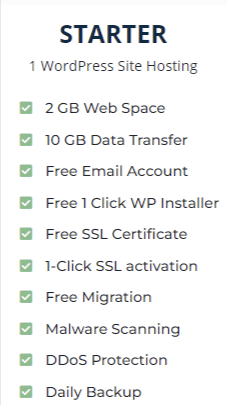
The SeekaHost Starter plan (£1/month) comes with more than just WordPress hosting.
With such an affordable hosting plan, you can save the money you’d otherwise have to spend on:
- SSL certificate
- Malware scans and protection,
- DDoS protection,
- Website backup services, and
- Email service providers
5. Build a monetization plan
Just having a website won’t help you make money. You will have to offer some value to your audience to be able to monetise your site. And the simplest way to do that is by building a blog where you share valuable information. Once you have built a cheap website and have an active blog, it is not hard to start making money from it. Here is a detailed guide that can help you make money blogging and you can find some blogs already doing that built with SeekaHost domains and web hosting here. There are several ways to make money with a blog, which you can learn more about in this video: But we will be exploring a few key options here:1. Advertising
You can display ads on your website and earn money when visitors click on them. Google AdSense is a great program to enrol in for that.2. Affiliate marketing
You can earn commissions by promoting other people's products on your website. You'd be earning a referral fee when someone buys a product from your affiliate blog.3. eCommerce
If you have a product or service to sell, you can sell it online via your website. Integrating eCommerce facilities on your website isn’t too tough or costly either. Especially if you don’t have a very elaborate product range. You can also sell digital products (eBooks, audio, videos, and digital art) via your website and start an online business in this way.4. Subscription-based service
Build a loyal audience for your blog content? You can now offer a subscription-based service. It involves creating a paywall and charging your readers for your content.5. Consulting
If you have a service that you can sell, you can use your website to find clients. Write engaging and informative blogs giving genuine and right guidance. This will build audience trust. And later, you can get interested visitors to schedule paid consultations.6. Donations
If you have an ardent fan base for your blog, you can request one-time or recurring donations from them. Those who really like your content would be happy to donate to keep the content coming.7. Sponsored content
All companies need promotion. And you get paid for creating and publishing content about other businesses on your site. You can offer to publish guest content which is known as guest posting or guest blogging or media placements which include press releases, interviews, and more.8. Ad placement
Don't want to use Google AdSense or other ad placement programs? You can also directly sell ad space on your website. You can ask companies to pay to display their ad banners on your site. All you need to do is find companies whose target audience overlaps with your visitor base.9. Paid reviews
People trust reviews from real people more than what businesses tell about themselves. So you can review products and services and write about them on your website. And you can get paid by the product and service providers for your reviews.10. Create an eBook or course
If you have a lot of first-hand experience and expertise about something, you can write an eBook on the topic. And then you can sell your eBook on your website. If possible, you can also create a course and get people to pay and enrol for the course. Both these - eBooks and courses - just must be created once and you can continue earning from them for a long time.6. Build an audience and improve traffic
A website becomes a money-making machine only when there is an audience. Without an audience, you cannot monetise your cheap website. But you don’t have to worry about getting an audience for your website. You can boost your site’s online visibility and reach by following some free yet useful guides. I’d suggest you start by reading some of the SeekaHost’s CEO guides as he is an established SEO consultant who has ranked thousands of websites on Google and knows everything about SEO as he shows in this tutorial: But just ranking on search engines isn't enough. You also need website traffic. And you can learn how to get that from Fernando Raymond’s guide on driving organic SEO traffic.Start making money with your cheap website
Now that you know how you can build a cheap website and effectively make money from it, it is time to get started. The extra cash is calling you, don’t let the opportunity pass. Build a steady source of a second income today to scale it in the future. You have nothing to lose with the free WordPress hosting from SeekaHost.Author Profile